Registering your PEAK generator
There are two ways to activate your generator.
1. Visit www.peakscientific.com/activate
2. Download the PEAK Gas App.
In both cases you will need your gas generator serial number to activate your product.
Where to find your Serial Number
You can find your serial number on the LCD display on the front of the generator or on the label at the rear of the unit. The serial number will be indicated by the term "S/N:" and will be a 9 digit number on the LCD display and an 18 digit number on the rear - you will only need the final 9 digits to activate your generator.

My PIN is not working!
Please check you have entered the 9 digit serial correctly. Example:
If your serial number is "S/N: 77XXXXXXX" on the LCD display screen at the front of the generator or "Serial No. 00000000077XXXXXXX" on the label on the rear of the unit. Please only enter the last 9 digits of the code beginning with "77", there should be no letters, spaces or special characters.
Getting the PEAK Gas App
To get started, you'll need a smartphone/tablet with either Android version 4.1 or later, iOS 14 or later:
- Android users can download the PEAK Gas App for free from the Google Play Store.
- iPhone users can download the PEAK Gas App for free from the Apple App Store.
Register Your generator with the Peak Genius App
Simply download the App to your Android or Apple device.
- Once installed select your language.
- Next select the "Activate a new product" button on the app to register a new generator.

- Enter the generator's 9 digit serial number, remembering only to enter the last 9 digits of the serial beginning with "77".
- Next enter all the relevant details in the registration form, including the installation date, email address and company name.
- A 4 digit pin will display once you have submitted the form. This pin will be used to activate your generator.
- At this point an email will be sent to the submitted email address. This allows you to keep a record of the generator's activation pin for future reference.
- If you have additional generators to activate please repeat the process for each generator.

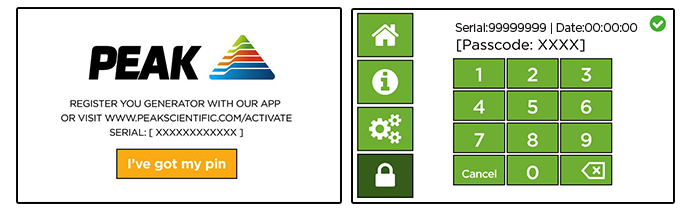
- Enter the pin into the unit by selecting the "I've got my pin" button on the LCD display.
- Once the code has been entered, the initialization of your new generator will commence.
Need more help?
Contact your local PEAK technical support desk:
Europe: +44-141-530-4180
USA: +1 866-732-5427
China: +86 21-5079-1190
Email: support@peakscientific.com